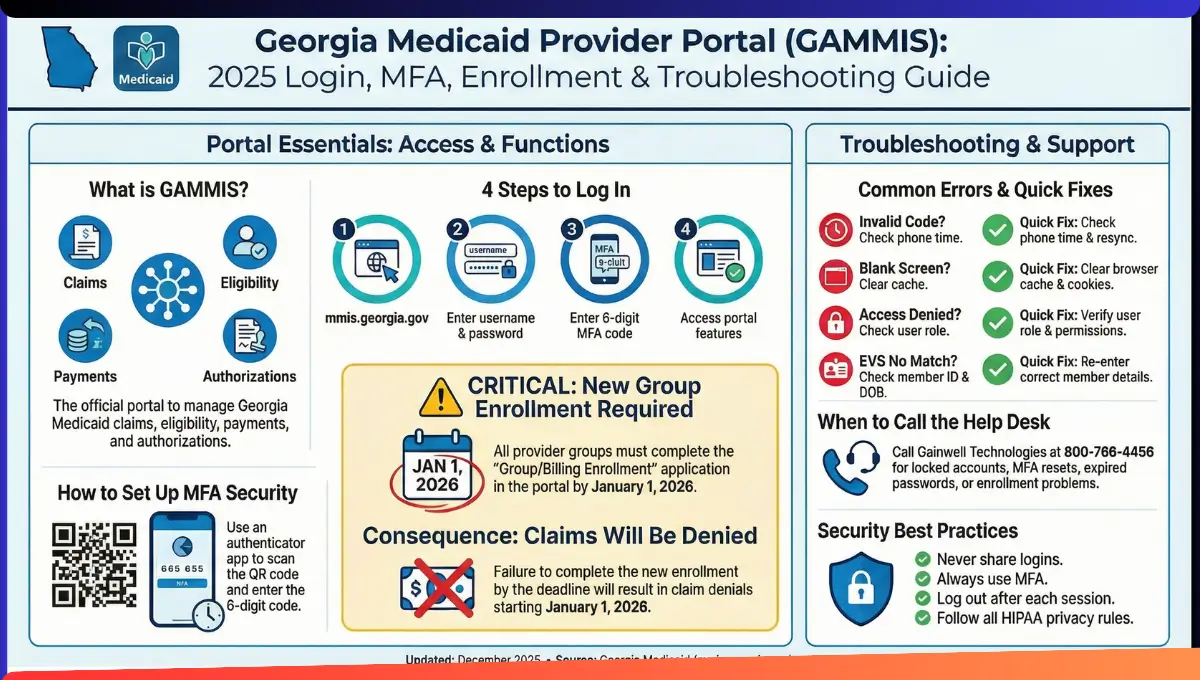
The Georgia Medicaid Provider Portal is called GAMMIS (Georgia Medicaid Management Information System). It is the main website for healthcare providers in Georgia.
Providers use GAMMIS to submit claims, check patient eligibility, and get paid by Medicaid.
Here is the Gammis Login page link: gammis provider portal
Why is this portal trending now?
Georgia Medicaid requires all provider groups to complete new enrollment by January 1, 2026. If you miss this deadline, your claims will be denied starting January 1, 2026.
Page Contents
- 1 How Does GAMMIS Provider Portal Work?
- 2 How to Log In to GAMMIS (Step-by-Step)
- 3 How to Set Up Your Account (New Providers)
- 4 Multi-Factor Authentication (MFA) Explained
- 5 MFA Troubleshooting: Common Problems & Solutions
- 6 URGENT: Group/Billing Provider Enrollment Deadline
- 7 Georgia Medicaid Data Breach (July 2025)
- 8 Common GAMMIS Problems & Solutions
- 9 Account Security Rules
- 10 Contact Information & Help
- 11 Official Sources & References
- 12 Key Takeaways
- 13 About the Author
Quick Summary
- GAMMIS is Georgia’s official Medicaid provider portal
- New group enrollment is required by January 1, 2026
- Multi-factor authentication (MFA) is mandatory for all accounts
- Providers can submit claims, check eligibility, and track payments online
- A data breach in July 2025 affected 912 Medicaid members
- Help is available at (800) 766-4456 Monday–Friday
How Does GAMMIS Provider Portal Work?
GAMMIS has two main areas:
Public Access (No Login Needed)
Anyone can visit the portal to:
- Find information about Georgia Medicaid
- Search for active Medicaid providers
- Download provider manuals and forms
Secure Provider Access (Login Required)
Registered providers log in with:
- User ID
- Password
- 6-digit MFA code from an authenticator app
Once logged in, providers can:
- Submit professional and facility claims
- Check Medicaid member eligibility instantly
- Request prior authorizations
- View payment details and remittance advice
- Update provider information
- Track enrollment applications
How to Log In to GAMMIS (Step-by-Step)
Step 1: Go to the GAMMIS Website
Visit www.MMIS.georgia.gov
Save this page in your bookmarks. Use a desktop or laptop computer for best results.
Step 2: Find the Login Button
Look for “User Information” on the upper left side of the homepage. Click the Login button.
Step 3: Enter Your Credentials
Type in:
- Your User ID (username)
- Your Password
- Your 6-digit MFA code
The MFA code comes from an authenticator app on your phone. The code changes every 30 seconds.
Step 4: Access Your Account
After entering the correct information, you will see your secure provider dashboard.
First-time users: Wait at least 1 hour after receiving your registration email before logging in.
How to Set Up Your Account (New Providers)
When Do You Get Your PIN?
New providers receive a PIN letter 5–7 business days after enrollment approval. You need this PIN to create your GAMMIS account.
Steps to Activate Your Account
- Go to the PIN Activation page on GAMMIS
- Enter your Provider ID and PIN from your letter
- Create a strong password
- Set up Multi-Factor Authentication (MFA)
- Complete the verification steps
- Check your email for a confirmation message
Important: Wait 1 hour after getting the confirmation email before you log in. Check your spam folder if you do not see the email.
Multi-Factor Authentication (MFA) Explained
What Is MFA?
MFA adds extra security to your account. You need two things to log in:
- Your password (something you know)
- A code from your phone (something you have)
All GAMMIS accounts must use MFA.
Which Authenticator Apps Work?
You can use any app that supports TOTP (Time-Based One-Time Passcode), including:
- Google Authenticator
- Microsoft Authenticator
- Twilio Authy
- Duo Mobile
- Okta Verify
How to Set Up MFA
- Log in to GAMMIS with your username and password
- The system will show you a QR code
- Open your authenticator app
- Tap “Add Account” or the plus sign (+)
- Scan the QR code with your phone camera
- Enter the 6-digit code shown in the app
- Your MFA is now active
No camera? You can type the secret code manually instead of scanning the QR code.
MFA Troubleshooting: Common Problems & Solutions
Problem 1: The 6-Digit Code Does Not Work
Solution: Check your phone’s time setting. The code only works if your phone shows the correct time.
Go to Settings → Date & Time → Set Automatically
Verify the correct time at https://www.time.gov/
Problem 2: Cannot Find GAMMIS in Authenticator App
Solution: Do not use your phone’s camera app directly.
Instead:
- Open your authenticator app first
- Tap “Add Account” or the plus sign (+)
- Choose “Scan QR Code”
- Allow camera access
- Point your phone at the QR code on the screen
Problem 3: Blank Screen After Entering Code
Solution: The code you entered is incorrect. Authenticator codes change every 30 seconds.
Wait for the next code to appear. Try again with the new code.
If it still fails:
- Write down the current code
- Wait 30 seconds
- Try the code you wrote down
Problem 4: Error After Multiple Wrong Codes
Solution: You entered the wrong code too many times. The system locked you out.
To reset:
- Close all browser windows completely
- Wait 2–3 minutes
- Open a new browser window
- Check your phone’s time setting
- Make sure you are looking at the correct GAMMIS account in your authenticator app
- Try logging in again
Problem 5: Lost Phone or Need to Reset MFA
Solution: Call the Gainwell Technologies Helpdesk at (800) 766-4456
They will reset your MFA. When you log in next, you will get a new QR code to scan.
You still need to know your password.
Problem 6: Forgot Password
Solution: On the GAMMIS login page:
- Click “Having Trouble Logging In?”
- Enter your User ID
- Enter your email address
- Check your email for a password reset link
- Click the link
- Answer your security question
- Create a new password
Note: This only works if you changed your password in the last 180 days. If not, call the helpdesk at (800) 766-4456.
URGENT: Group/Billing Provider Enrollment Deadline
What Is the New Requirement?
Starting July 1, 2025, Georgia Medicaid requires all provider groups to complete a new enrollment process.
This applies even if you already have a payee ID or existing enrollment.
Why Is This Important?
Deadline: January 1, 2026
If you do not complete group enrollment by this date, your claims will be denied starting January 1, 2026.
Who Must Enroll?
You must complete group enrollment if:
- You submit professional claims under a group NPI
- Your rendering provider NPI is different from your billing provider NPI
- You are a clinic or group practice
- You already have a payee ID (you still need to enroll as a group)
Exception: DBHDD Facility Providers and FQHC Providers do NOT need to complete group enrollment.
How to Complete Group Enrollment
- Log in to GAMMIS at www.MMIS.georgia.gov
- Click Provider Enrollment → Provider Enrollment Application
- Choose “Group/Billing” as your enrollment type
- Fill out the group information form:
- Group demographic details
- Business ownership information
- Group NPI (must be valid and registered)
- Payee Medicaid ID (if you have one)
- Under Affiliations, add at least 2 individual rendering provider Medicaid IDs
- Upload required documents:
- Current Business License
- Georgia Secretary of State Certificate of Existence
- Submit the application
- You will receive an Automated Tracking Number (ATN)
- Check your GAMMIS portal regularly to track your application status
How Long Does Approval Take?
Most applications are approved within 2 weeks of submission. However, incomplete applications take much longer.
Do not wait until the last minute. Submit your application as soon as possible.
For more details about Medicaid provider enrollment across the country, see our guide to Medicaid income limits and eligibility by state.
Georgia Medicaid Data Breach (July 2025)
What Happened?
In July 2025, a data breach affected 912 Georgia Medicaid members.
An unauthorized caller used a phone scam to access a reimbursement account at Gainwell Technologies, Georgia Medicaid’s fiscal agent.
What Information Was Exposed?
- Medicaid member names
- Medicaid member IDs
- Coverage details
- Service dates
- Payment information from billing statements
What Was NOT Exposed?
- Social Security numbers
- Individual account passwords
- Bank account numbers
There is no evidence that the stolen information was misused.
What Is Being Done?
Gainwell Technologies:
- Notified all affected members
- Offered 1 year of free credit monitoring through IDX
- Set up a helpline for affected members: 1-833-788-9712
What Should Providers Do?
This breach shows why strong account security is critical.
All providers should:
- Use strong, unique passwords
- Never share login credentials
- Enable MFA on all accounts
- Report suspicious activity immediately
Common GAMMIS Problems & Solutions
Problem: Portal Options Not Visible After Login
Solution: Wait at least 1 hour after receiving your registration confirmation email. If options are still missing, check your spam folder for the confirmation email.
Problem: Enrollment Application Taking Too Long
Solution: Most applications are processed within 30 days if complete. Missing documents or errors delay processing significantly.
Check your GAMMIS portal for messages about missing information.
Problem: Cannot Reset Password
Solution: If you have not changed your password in 180 days, self-service password reset will not work.
Call the Gainwell Helpdesk at (800) 766-4456 for help.
Account Security Rules
All GAMMIS users must follow these rules:
- Keep your username and password private
- Do not share your login with anyone
- You are responsible for all activity under your account
- Report lost or stolen credentials immediately
- Follow HIPAA and federal Medicaid privacy laws
- Do not use the portal for personal reasons
- Do not share member information with unauthorized people
Breaking these rules can result in account suspension and legal penalties.
Contact Information & Help
Gainwell Technologies Helpdesk
Phone: (800) 766-4456
Website: www.MMIS.georgia.gov
Hours: Monday–Friday, 8:00 AM – 5:00 PM EST
Credit Monitoring (Data Breach)
Phone: 1-833-788-9712
Official Sources & References
This guide uses information from:
- Georgia Department of Community Health (DCH) – Official Medicaid program administration
- GAMMIS Portal (www.MMIS.georgia.gov) – Official Georgia Medicaid provider portal
- Gainwell Technologies – Georgia Medicaid fiscal agent
- Georgia Secretary of State – Business registration and verification
For the most current information, always check official .gov websites or contact the Gainwell helpdesk directly.
Last Updated: December 2025
Key Takeaways
The Georgia Medicaid Provider Portal (GAMMIS) is essential for all Medicaid providers in Georgia. The most urgent issue in 2025 is the January 1, 2026 group enrollment deadline.
Do not wait. Complete your group enrollment application today to avoid claim denials in 2026.
If you need help with login issues, MFA setup, or enrollment questions, call the Gainwell helpdesk at (800) 766-4456.
For general questions about Medicaid eligibility and benefits, explore our complete state-by-state guides on CheckMedicaid.com.
About the Author
Akash Biswas, MSW
My name is Akash Biswas. I like to read hard government rules and make them easy to understand. Many people find Medicaid and Medicare confusing, and that is okay. I want to help.
I made this website so families can learn in simple words. I take big, hard information and break it into small, easy steps. I want every person to feel calm and sure when they read about Medicaid or Medicare.
My goal is to help you understand who can get help, how to apply, and what to do next. I hope this website makes your life easier and helps you get the care you need.
I study Medicaid and Medicare rules every day and work hard to share clear, correct, and easy information for all families.
Credentials:
- MSW in Social Work
- Former SNAP & Medicaid caseworker trainer
- Advocate for accessible benefits education
- Published writer on poverty, healthcare access, and food security
Akash personally writes and reviews most of the articles and calculators on CheckMedicaid.com, ensuring they are accurate, practical, and easy to understand.